Engaging learners in online instructional sessions can be challenging—especially when teaching quantitative methods, where abstract concepts and coding exercises can quickly feel overwhelming. In this article, we begin by sharing practical strategies for building engagement in general virtual learning environments, drawing on established educational frameworks. Then, we share approaches for applying these strategies specifically for teaching coding and quantitative content. Our goal is to provide instructors with techniques they can integrate into their own sessions to foster interaction, support learning, and make online teaching more effective and dynamic.
Creating an Engaging Online Learning Environment
It can be challenging to teach online when faced with numerous silent, black boxes on Zoom. Here, we begin by sharing strategies for organically improving the engagement of online sessions to support both better learning outcomes for learners and a better teaching experience for instructors.
The following strategies come from the Community of Inquiry Framework, which “represents a process of creating a deep and meaningful learning experience through the development of three interdependent elements: social, cognitive, and teaching presence” (The Community of Inquiry Project). All three elements are essential for supporting an engaged online learning environment, and below we share examples for how to develop each element.
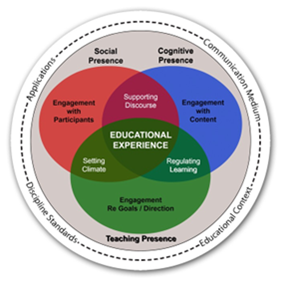
Figure 1: Community of Inquiry Framework
Teaching Presence – Engagement with Goals/Direction
‘Teaching Presence’ relates to an instructor’s engagement with the goals and direction of their course. It involves the design, facilitation, and direction of the course, and can impact the climate of the class and how learning is regulated in the class. Teaching Presence is developed through all the work instructors do to plan, design, and prepare for teaching. For example, it is important to define your learning objectives, assessments, and class activities using Backward Design. An additional step instructors can take to build their Teaching Presence and support engagement in online courses is to create a learner-centered syllabus. These steps will help you prepare to lead a course that has a climate of engagement and supported learning.
Cognitive Presence – Engagement with Content
‘Cognitive Presence’ relates to how an instructor creates opportunities for deeper understanding through discourse and engagement with the course content. Instructors can build Cognitive Presence by designing content in a way that supports deeper understanding. The principles of multimedia learning are principles designed to optimize learning when using multimedia. For example, the ‘multimedia principle’ asserts that people learn best from a combination of words and pictures. Following this principle, ideally your learning materials will use a mix of text and images, ensuring the images are used to illustrate key points and clarify meaning. The ‘segmenting principle’ asserts that better learning outcomes are achieved when information is segmented and learners have control over the pace. Applying this principle could be done by breaking down complex information into smaller, more manageable chunks, and by presenting information in a step-by-step approach to allow learners to process each segment independently and build understanding gradually.
It is also important to remember that every learner has different preferences and needs for how they review, absorb, and retain information. Therefore, you should design your learning environments to give students multiple ways to learn and express their learning (Universal Design for Learning). Additionally, you need to ensure your course materials are designed to be accessible:
- Ensure any images have alternative text so that learners using a screen reader can benefit from the additional support the image is meant to provide in your materials.
- Use captions in programs like Zoom or Powerpoint to ensure deaf learners can learn the necessary content from your sessions.
- Ensure any documents you create and share use heading styles and descriptive hyperlink text so they are screen reader accessible.
Social Presence – Engagement with Participants
‘Social Presence’ is focused on how an instructor engages with participants in their learning environment. A key tenet of this element is ensuring that participants can bring their real selves to the conversations and interactions that happen in the learning environment. Some techniques for achieving this tenet include beginning sessions with a community icebreaker (for example, “What is your favorite food you’ve eaten recently?”), using the chat waterfall technique, and/or a polling tool such as Wooclap for occasional knowledge checks during the session.
There are many additional techniques instructors can use to build engagement during online sessions. For synchronous responses, you can use the Zoom chat to have learners respond to questions, whether they are open ended or multiple choice. Additionally, Zoom chat allows learners to react to other responses, creating space for shared community building. If you are asking questions that would benefit from anonymous responses or want more options for question types, designated online polling tools such as Wooclap are a great alternative. For quick pulse checks and non-verbal feedback, you can have learners respond using Zoom reactions or turning their cameras on and holding up signals with their hands.
You can also build in opportunities for group work in your online sessions. Group work helps to break up the disengagement, especially if most learners have their cameras off. One approach is to do interactive brainstorming using tools such as a shared Google doc or a Zoom whiteboard. You can ask the group a question, and encourage them to contribute answers or thoughts in the shared online space. Another group work technique that works well online is Think-Pair-Share. With this technique, learners benefit from individual thinking time, paired discussion, and group learning. During Zoom online sessions, you can take advantage of breakout rooms to pair learners together.
Supporting Engagement in Online Coding Sessions
You might be wondering how these techniques would work for quantitative concepts or live coding sessions. In a live coding session, the instructor writes and debugs code in real time while students observe. This approach is valuable because it models authentic problem-solving. However, without intentional design, learners can quickly become overwhelmed by the volume of new information and lose track of the coding process. To address this, we offer several strategies to make live coding both effective and engaging.
Scaffold Your Materials and Lessons
Scaffolding refers to the temporary, structured supports that help learners progress from what they already know toward new skills. Vygotsky’s concept of the Zone of Proximal Development (ZPD) describes the ‘sweet spot’ for learning: the space where tasks are just beyond what students can do independently, but achievable with guided support. Effective scaffolding targets this zone, gradually reducing assistance as learners build mastery.
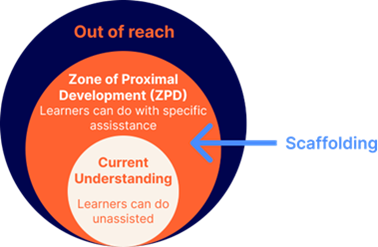
Figure 2: Zone of Proximal Development
In coding sessions, scaffolding can take many forms:
- Simple modeling. When introducing a new function or operator, walk through a short, concrete example. For instance, when covering miscellaneous operators in R, an extended explanation combined with a sample code snippet and its output would be more effective than a brief description alone.
- Contextual explanations. Before assigning a task, highlight and explain the prerequisite concepts learners need to understand.
- Partially-completed code snippets. Instead of starting from a blank screen, students work with example code that has key pieces removed. This lowers cognitive load while still requiring independent thought. The screenshot below shows an example, where arguments in data visualizing functions are left out, so that students can focus on the learning objective of ‘modifying aesthetics of plot layers including color, shape, size and scale’.
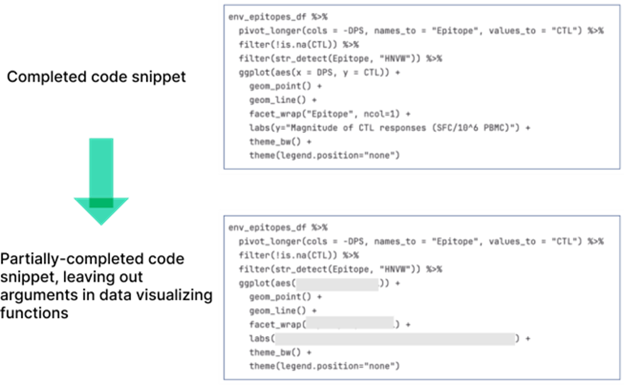
Figure 3: Partially Completed Code Snippets
Apply Active Learning Techniques to Coding Sessions
Active learning is a powerful way to keep students engaged during coding demonstrations. Rather than coding continuously, instructors can pause at key moments, invite learners to predict what comes next, or pose meaningful questions. This aligns with the segmenting principle in multimedia learning, which emphasizes breaking content into manageable chunks. By interweaving short exercises into longer coding sessions, learners can consolidate newly-acquired skills before moving on to new material.
Another particularly effective strategy is the think-aloud technique, where the instructor verbalizes their thoughts while performing a task. For example, you can explain verbally why you choose a particular function, how you approach debugging, or what logic drives a conditional statement. By making expert reasoning visible, this not only helps students understand what to code, but also why and how. Even when you make a mistake, verbally talking through your trouble shooting process will turn the mistake into a valuable learning opportunity, where learners see how expert coders problem-solve in real-time.
Finally, structured activities such as think-pair-share give learners space to collaborate and articulate their thinking. Ask students to first think about a coding task individually, then discuss their solution with a peer (easily done through breakout rooms on Zoom), and finally return to the larger group to share insights.
Conclusion
Building engagement in online instruction requires thoughtful planning, intentional design, and a willingness to adapt strategies that put learners at the center of the experience. Whether through strengthening teaching presence, designing cognitively supportive materials, fostering social connections, or scaffolding coding sessions with active learning techniques, small adjustments can make a significant difference in how learners connect with content and with one another during online sessions. By applying these approaches, instructors can transform virtual sessions from passive experiences into dynamic, interactive environments that support deeper understanding and lasting learning.
Jess Dewey, PhD, (she/her) is a STEM Teaching consultant at Duke University where she supports instructors in creating active, inclusive, and innovative learning environments. She holds a B.S degree in Ecology, Evolution, and Behavior and a Ph.D. in STEM Education, both from the University of Minnesota – Twin Cities. Before joining Duke, she worked as a postdoctoral scholar on an HHMI Inclusive Excellence grant at Syracuse University helping Biology and Chemistry instructors transform their courses to include active and inclusive pedagogies.
Xinzhu Wang (she/her) is a Teaching Consultant at Duke University, where she collaborates with faculty in STEM fields to enhance teaching and learning. She specializes in instructional design, course evaluation, technology‑enhanced learning tools, and STEM education. Drawing on learning science principles and evidence‑based approaches, she supports instructors in designing effective, inclusive learning experiences. Xinzhu holds a B.S. in Educational Technology from Beijing Normal University and an M.S. in Educational Technology and Applied Learning Sciences from Carnegie Mellon University. Before joining Duke, she worked as a curriculum designer, developing and teaching Scratch programming courses for young learners.
References
“The Community of Inquiry: About the Framework,” The Community of Inquiry, accessed October 10, 2025, https://www.thecommunityofinquiry.org/coi
CIRTL MOOC, “Introduction to Backwards Design,” August 31, 2015, YouTube, https://www.youtube.com/watch?v=UUSojE3Gcto
“Creating a Learner-Centered Syllabus”, Learning Education & Lifetime Education, Duke University, accessed October 10, 2025, https://lile.duke.edu/creating-a-learner-centered-syllabus/
“Mayer’s 12 Principles of Multimedia Learning”, Digital Learning Institute, accessed October 10, 2025, https://www.digitallearninginstitute.com/blog/mayers-principles-multimedia-learning
“Universal Design for Learning Guidelines”, CAST, 2024, https://udlguidelines.cast.org
“Accessibility in Canvas”, Duke Canvas, accessed October 10, 2025, https://go.canvas.duke.edu/instructors/learning-canvas/self-paced-guides-canvas-duke/accessibility-canvas/
“Write helpful Alt Text to describe images”, Digital Accessibility, Harvard University, accessed October 10, 2025, https://accessibility.huit.harvard.edu/describe-content-images
“Managing automated captions as the host of a meeting or webinar,” Zoom Support, July 23, 2025, https://support.zoom.com/hc/en/article?id=zm_kb&sysparm_article=KB0062813
“Present with Real‑Time Automatic Captions or Subtitles in PowerPoint,” Microsoft Support, accessed October 10, 2025, https://support.microsoft.com/en-us/office/present-with-real-time-automatic-captions-or-subtitles-in-powerpoint-68d20e49-aec3-456a-939d-34a79e8ddd5f
“Using Headings to Structure Content,” University of Michigan-Flint, accessed October 10, 2025, https://www.umflint.edu/accessibility/using-headings-to-structure-content/
“Master the Art of Accessible Link Text,” WCAG.com, January 6, 2025, https://www.wcag.com/blog/writing-meaningful-link-text/#Best_Practices_for_Accessible_Link_Writing
“Waterfall Chat Activities,” University of Iowa Pressbooks, accessed October 10, 2025, https://pressbooks.uiowa.edu/hic-toolkit/chapter/waterfall-chat-activities/
“Wooclap,” Learning Innovation & Lifetime Education, Duke University, accessed October 10, 2025, https://lile.duke.edu/technology/wooclap/
“Chatting in a Zoom meeting,” Zoom Support, June 10, 2025, https://support.zoom.com/hc/en/article?id=zm_kb&sysparm_article=KB0064400#mcetoc_1itdhs78a1f
Xinzhu Wang, “Active Learning with Wooclap,” Learning Innovation & Lifetime Education, Duke University, December 14, 2023, https://lile.duke.edu/blog/2023/12/active-learning-with-wooclap/
“Using webinar reactions,” Zoom Support, June 26, 2025, https://support.zoom.com/hc/en/article?id=zm_kb&sysparm_article=KB0059395#h_01HDPTR62JEKX664NMJ9S4P0ND
“Getting started with Zoom Whiteboard,” Zoom Support, August 5, 2025, https://support.zoom.com/hc/en/article?id=zm_kb&sysparm_article=KB0059671
“Think-Pair-Share (Active Learning Strategy),” Ira A. Fulton Schools of Engineering Learning and Teaching Hub, Arizona State University, accessed October 10, 2025, https://lth.engineering.asu.edu/reference-guide/think-pair-share/
“Enabling or disabling meeting breakout rooms,” Zoom Support, September 9 2025, https://support.zoom.com/hc/en/article?id=zm_kb&sysparm_article=KB0061583#h_9285303e-c6b2-46d6-96af-59c5bb206448
“Exploring Vygotsky’s Zone of Proximal Development,” Teach HQ, accessed October 10, 2025, https://teachhq.com/article/show/exploring-vygotskys-zone-of-proximal-development
“Think‑Alouds,” Reading Rockets, accessed October 10, 2025, https://www.readingrockets.org/classroom/classroom-strategies/think-alouds